Pages

Monday, March 19, 2018

'API life Cycle is invalid!' Error for Oracle API CS API's

Hi, just thought to post the solution for this error, when I hit this error, searched all over internet couldn't find any specific blog describing possible cause of getting this error while invoking an API.
Let me give some background. I have created an API using Oracle API Platform Management Portal and when I tried invoking that API using google postman tool I was getting below error -
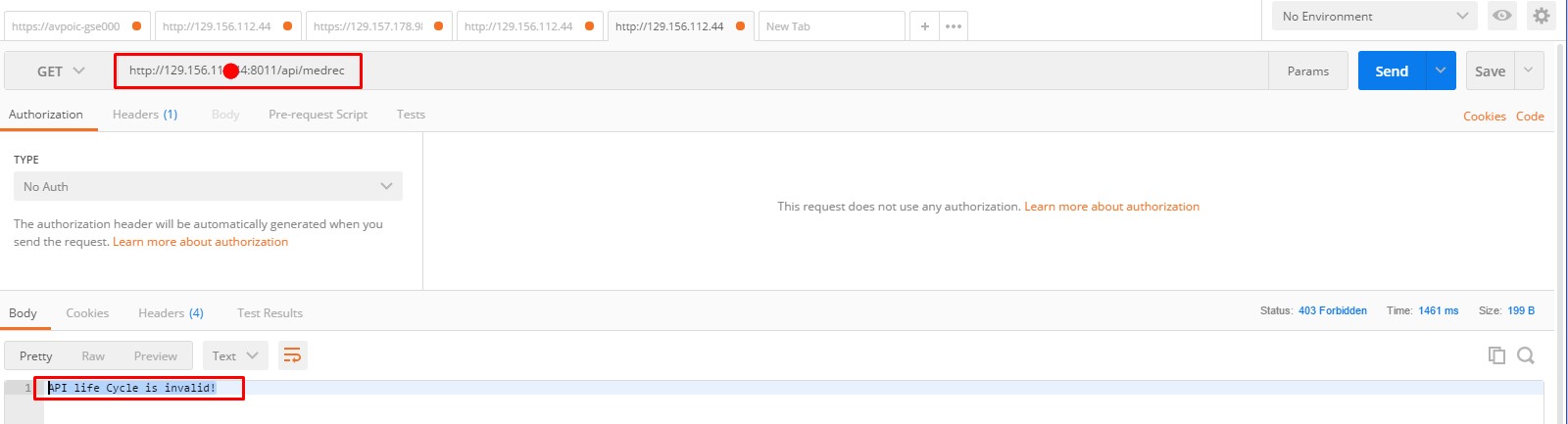
postmane
This was a silly mistake but worth highlighting. When we create API definition in API Management portal there is tab page "API Implementation" which has configuration field "API Request" where we need to define the API endpoint URL where consumer of this API will send input request. While I was declaring that portion I have given this URL "api/medrec".
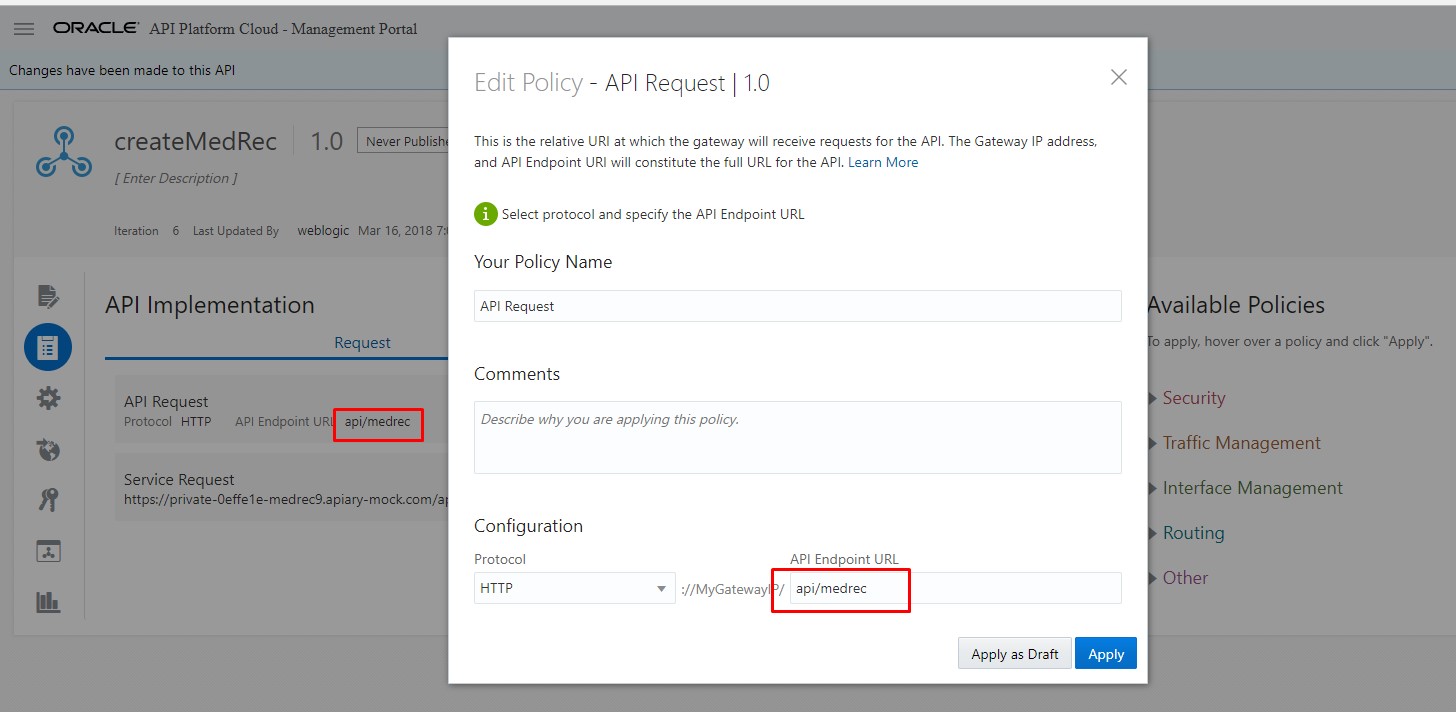
APIRequest
There is no issue with declaring the endpoint URL in this way. However, the important point which I need to stress up on that anything after first forward slash become Private URI portion (e.g. medrec) of the API which will be passed to back-end service and if your back-end service doesn't know how to handle this private URI then we see this error while invoking the API. 
I am not saying this is one and only root cause which can produce this error message, but in my case this was the reason. There could be more scenarios which might can result same error message. If I hit with some other causes resulting this error message, I will update this blog post.
In order to fix this error, either modify the back-end service to deal with this private URI or change front-end API endpoint URL. In my case I have changed front-end endpoint URI for my API to this "apimedrec"
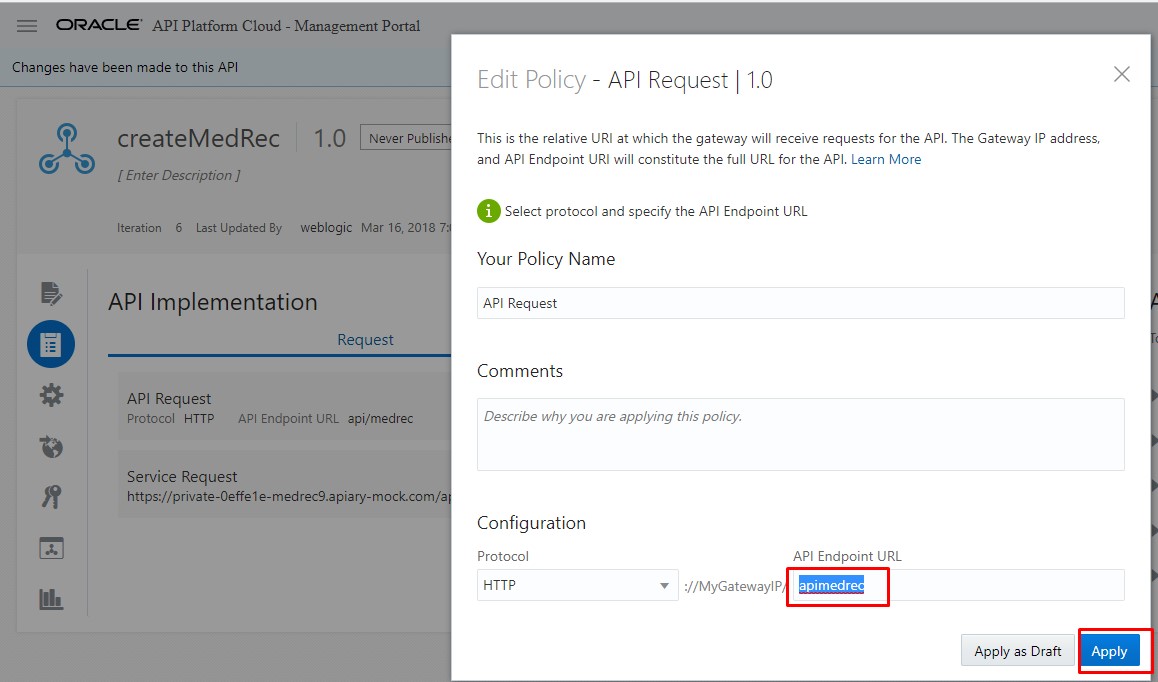
APIRequest1
I hope when next time someone will search google with error message "API life cycle is Invalid" this blog may be able to fix that issue.

Thursday, March 15, 2018

Oracle API Platform Cloud Service – Installation Steps of Gateway Node

In this blog I am going to document the Oracle API Platform Gateway Node (Version : 18.1.3) Installation steps which is one of the critical components of API Platform Cloud Service.
Oracle provides API Platform Cloud Service as a foundation product for API Management that comprises the Full API Lifecycle, encompassing the complete API Design & Documentation, API Security, Discovery & Consumption, Monetization, and Analysis etc.
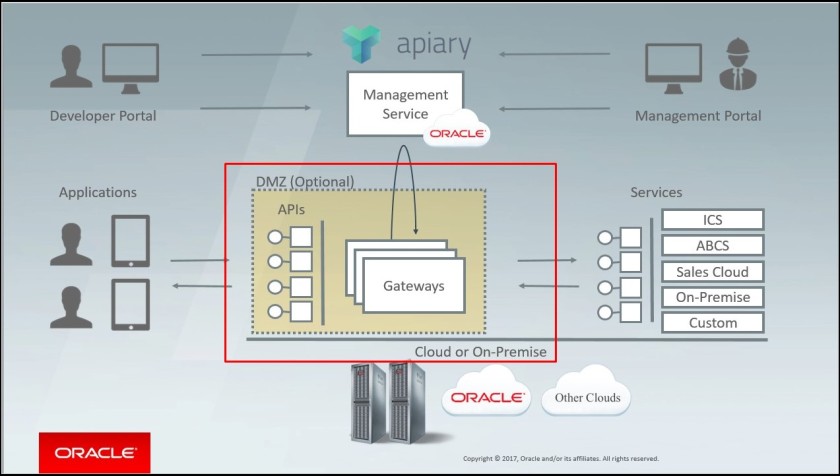
Oracle API Platform comprises 3 major components as stated below to serve specific purpose-
Management Portal – This is used to create and manage APIs, deploy APIs to gateways, and manage gateways, and create and manage applications. You can also manage and Deploy APIs and manage gateways with the REST API.
Developer Portal – Application developers subscribe to APIs and get the necessary information to invoke them from this portal.
Gateway Node  – This is the security and access control run-time layer for APIs. Each API is deployed to a gateway node from the Management Portal or via the REST API.
In addition to above, Oracle also offer Oracle Apiary to quickly design, prototype, document and test APIs.
Below is the high level architecture diagram of API Platform.


Wednesday, March 8, 2017

SOA Suite 11g to SOA Suite 12c Migration Experience !!!

In this post, I am going to list of some of the problems which I could remember; I have faced during SOA Suite 11g to SOA Suite 12c migration for one the recent project which I have completed.

Problem1: 'jca.retry.count’ error

While running some of the composite, transaction was getting rolled back with below error message –
Cannot parse JCA binding retry property 'jca.retry.count', value '0' due to: Value of JCA binding retry property
'jca.retry.count' must be a positive number: Cannot parse JCA binding retry property 'jca.retry.count', value '0' due to:
Value of JCA binding retry property 'jca.retry.count' must be a positive number</summary>
,code=<code>oracle.fabric.common.FabricException</code>
,detail=<detail>oracle.fabric.common.FabricException: javax.resource.ResourceException: Cannot parse JCA binding
retry property 'jca.retry.count', value '0' due to: Value of JCA binding retry property 'jca.retry.count' must be a positive
number: Cannot parse JCA binding retry property 'jca.retry.count', value '0' due to: Value of JCA binding retry property
'jca.retry.count' must be a positive number
at oracle.integration.platform.blocks.event.jms2.EdnBus12c.publish(EdnBus12c.java:1438

Solution 1:

This error was coming because ‘0’ was set for “NumberofRetry” located at this path
We have modified soainfrastructure>>
SOA Administration>> common properties>> More SOA Advance Configuration Properties >> Application
Defined Beans >> oracle.as.soainfra.config>>EDNConfig>>edn
I believe some internal changes been made for EDN delivery retry mechanism. Earlier as part of 11g, we were able to set “NumberOfRetry=0” but when we carried forward same value for SOA Suite 12c then composite start failing JCA error as listed above.
To fix this error we just change “NumberOfRetry =1” or any positive number up to 5.
Note: Setting number of “NumberOfRetry” =1 does not retry failed JCA transaction automatically.
Refer this document for detailed understanding about different value of NumberOfRetry and its impact.


Thursday, February 2, 2017

“Test Console” service not running. Contact administrator to start this service


I am sure if you are working as SOA administrator you might have bumped with this error. 

In this blog post I am just trying to highlight few configurations which needs to verified ; if user is not able to launch OSB test console. I have faced this issue couple of time in various environments but fix for that problem was always different, so I just thought to compile some of causes which might help you to fix your environment problem for the same issue. 

Please note: I may be keep adding more causes as I found related to this issue in future assignments.

When OSB console is not accessible then its look like this – 


Cause 1:
First and foremost problem, I have noticed that OSB server is not running mode many times. Although user able to access Oracle Service Bus Console which gets deployed on Weblogic Admin Server but if OSB server is not up and running then OSB test console will never work. So make sure Weblogic Admin Server and Weblogic OSB server both must be up and running condition.


Tuesday, January 24, 2017

Weblogic Users Password Policy Enforcement


Most of clients as part of their security obligation needs to reset weblogic user password frequently and want to adhere strict password policy to avoid any security loophole. Resetting the Weblogic password is very easy but in this simple article I will just explain how to implement strict password policy rule.  Below is one sample password policy requirement given which needs to be implemented.


In order to achieve above password policy, below steps need to be performed-

Navigate to WLS Admin console >> Domain Home >Summary of Security Realms >myrealm >Users and Groups >Providers >SystemPasswordValidator >> Provider Specific tab page >> change highlighted value as per below snap